
IR Extenders
Control your AV equipment from a distance with reliable IR extenders. Perfect for hidden components, cabinets, and multi-room setups—seamless remote control without line of sight.
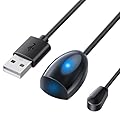
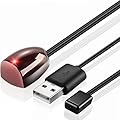
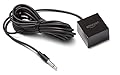


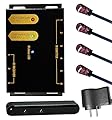
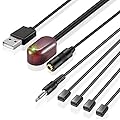

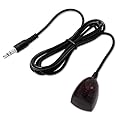
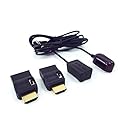
What Are IR Extenders?
IR extenders are devices that amplify and relay infrared signals from a remote control to electronic devices that are out of the direct line of sight or beyond the typical range of a standard remote. Most remote controls rely on infrared (IR) technology, which requires a clear, unobstructed path between the remote and the device. However, obstacles like walls, furniture, or cabinets can block these signals, making it difficult to control devices in certain setups. IR extenders overcome these limitations by capturing the IR signal, transmitting it through a wired or wireless system, and delivering it to the target device.
Components of an IR Extender System
A typical IR extender system consists of three main components:
-
IR Receiver: This small device captures the infrared signal emitted by your remote control. It’s usually placed in a location where it can easily detect the signal, such as near your TV or in an open area.
-
IR Transmitter/Emitter: The transmitter sends the captured IR signal to the target device. It’s positioned near or attached to the device you want to control, ensuring accurate signal delivery.
-
Control Unit/Hub: The central hub connects the receiver and transmitter, processing the signal and relaying it to the correct device. Some advanced models use wireless technology, while others rely on wired connections.
These components work together to create a seamless bridge between your remote and your devices, ensuring reliable operation regardless of physical barriers.
How Do IR Extenders Work?
IR extenders function by intercepting the infrared signal from your remote and relaying it to the intended device. Here’s a step-by-step breakdown of the process:
-
Signal Capture: When you press a button on your remote, it emits an infrared signal. The IR receiver, placed within the remote’s line of sight, captures this signal.
-
Signal Transmission: The receiver sends the captured signal to the control unit, either through a wired connection (such as an HDMI or Ethernet cable) or wirelessly via radio frequency (RF) or Wi-Fi.
-
Signal Delivery: The control unit processes the signal and forwards it to the IR transmitter, which is positioned near the target device. The transmitter then emits the IR signal to the device, mimicking the original remote command.
-
Device Response: The target device receives the signal and responds accordingly, whether it’s changing the channel, adjusting the volume, or powering on/off.
This process happens almost instantaneously, ensuring a smooth and responsive user experience. Advanced IR extenders can handle multiple devices simultaneously, allowing you to control an entire home entertainment system with a single remote.
Benefits of Using IR Extenders
IR extenders offer a range of advantages that make them an essential addition to any home entertainment or smart home setup. Below are some key benefits:
1. Extended Range and Flexibility
One of the primary advantages of IR extenders is their ability to extend the range of your remote control. Whether your devices are hidden inside a cabinet, located in another room, or placed at a distance, IR extenders ensure you can control them without needing to point your remote directly at them. This is particularly useful in large homes or setups where devices are not in direct line of sight.
2. Improved Aesthetics
IR extenders allow you to keep your devices tucked away in cabinets or media consoles, creating a cleaner and more organized living space. By eliminating the need for visible devices, you can maintain a sleek, minimalist look without sacrificing functionality.
3. Multi-Room Control
For households with complex entertainment systems, IR extenders enable multi-room control. You can operate devices in different rooms using a single remote, making it easy to manage your TV, stereo, or streaming devices from anywhere in the house. This is ideal for open-plan homes or setups with centralized media hubs.
4. Compatibility with Multiple Devices
Most IR extenders are compatible with a wide range of devices, including TVs, DVD/Blu-ray players, cable boxes, gaming consoles, and smart home devices like lights and thermostats. Many systems support multiple IR signals, allowing you to control several devices with one extender.
5. Easy Installation and Use
IR extenders are designed to be user-friendly, with straightforward setup processes that don’t require technical expertise. Most kits come with adhesive-backed receivers and emitters that can be easily placed in optimal locations. Wireless models further simplify installation by eliminating the need for extensive cabling.
6. Cost-Effective Solution
Compared to other home automation solutions, IR extenders are relatively affordable. They provide a cost-effective way to enhance your remote control capabilities without investing in expensive smart home systems or replacing existing devices.
Types of IR Extenders
IR extenders come in various forms to suit different needs and setups. Understanding the available options can help you choose the right system for your home.
1. Wired IR Extenders
Wired IR extenders use physical cables to connect the receiver, control unit, and transmitter. These systems are reliable and ideal for setups where devices are in close proximity. They’re often used in home theater systems or media cabinets where cabling can be neatly managed.
2. Wireless IR Extenders
Wireless IR extenders use RF or Wi-Fi to transmit signals, eliminating the need for cables. These systems are perfect for multi-room setups or situations where running cables is impractical. However, they may require a power source for the receiver and transmitter.
3. Single-Zone vs. Multi-Zone Extenders
-
Single-Zone Extenders: These systems are designed to control devices in a single location, such as a living room entertainment center. They’re simple and cost-effective for basic setups.
-
Multi-Zone Extenders: These advanced systems allow you to control devices across multiple rooms or zones. They’re ideal for larger homes or commercial applications where centralized control is needed.
4. Smart IR Extenders
Smart IR extenders integrate with smart home ecosystems, such as Amazon Alexa, Google Home, or Apple HomeKit. These systems allow you to control devices using voice commands or smartphone apps, adding an extra layer of convenience. Some smart extenders also support integration with universal remotes for streamlined control.
Choosing the Right IR Extender
Selecting the best IR extender for your needs depends on several factors, including your setup, budget, and desired features. Here are some tips to guide your decision:
1. Consider Your Setup
Evaluate the layout of your home and the placement of your devices. If your devices are in a single room, a wired or single-zone extender may suffice. For multi-room control, opt for a wireless or multi-zone system.
2. Check Compatibility
Ensure the IR extender is compatible with your devices. Most extenders work with standard IR-based remotes, but it’s worth confirming compatibility with specific brands or smart home systems.
3. Assess Range and Signal Strength
Choose an extender with sufficient range for your needs. Wireless extenders typically offer greater range, but signal strength can be affected by walls or interference. Check the manufacturer’s specifications for range details.
4. Look for Expandability
If you plan to add more devices to your setup in the future, consider an extender with multiple emitter ports or support for additional receivers. This ensures your system can grow with your needs.
5. Evaluate Ease of Use
Look for a system with a simple setup process and intuitive operation. Some extenders come with mobile apps or remote control programming features for added convenience.
6. Budget Considerations
IR extenders are available at various price points, from budget-friendly models to high-end smart systems. Determine your budget and prioritize features that align with your needs.
Applications of IR Extenders
IR extenders are versatile devices with applications beyond home entertainment. Here are some common uses:
1. Home Theater Systems
IR extenders are a staple in home theater setups, allowing you to control devices hidden in cabinets or mounted behind screens. They ensure seamless operation of your TV, receiver, and media players without compromising aesthetics.
2. Smart Home Integration
With the rise of smart home technology, IR extenders are increasingly used to control IR-compatible devices like lights, thermostats, and air conditioners. Smart extenders bridge the gap between traditional IR devices and modern smart home ecosystems.
3. Commercial Settings
In commercial environments like restaurants, bars, or conference rooms, IR extenders enable centralized control of multiple TVs or audio systems. This simplifies operation for staff and enhances the customer experience.
4. Gaming Consoles
Gamers can use IR extenders to control consoles tucked away in media centers, ensuring a tidy gaming setup without sacrificing accessibility.
Tips for Maximizing IR Extender Performance
To get the most out of your IR extender, follow these best practices:
-
Position the Receiver Strategically: Place the IR receiver in a location with a clear line of sight to your remote. Avoid placing it behind objects or in areas with heavy interference.
-
Secure the Emitters: Attach IR emitters directly to the IR sensor window of your devices for optimal signal delivery. Use adhesive backing or clips to keep them in place.
-
Minimize Interference: Keep the extender away from fluorescent lights, direct sunlight, or other sources of infrared interference.
-
Test the System: After installation, test the extender with all your devices to ensure reliable performance. Adjust the placement of components if needed.
-
Update Firmware: For smart IR extenders, check for firmware updates to ensure compatibility with new devices or smart home platforms.