
Fixed vs Tilting vs Full-Motion Mounts: How to Choose the Right One for Your TV
There's a particular kind of regret that shows up about three weeks after you've mounted a television. It's not buyer's remorse over the TV itself — it's the slow realization that you bought the wrong bracket. Maybe the screen is angled two inches too high above the fireplace and your neck aches after every movie night. Maybe you mounted it in the kitchen expecting to swivel it toward the table, only to find it's bolted stiff to the wall like a framed photograph. Wall mounts are one of those purchases people treat as an afterthought, right up until they're living with the consequences of not thinking it through.
The good news is that the decision isn't actually complicated once you understand what each mount type is built to do. Fixed, tilting, and full-motion mounts solve three genuinely different problems, and the "best" one has nothing to do with price and everything to do with where your TV lives and how you actually watch it.
This guide breaks down each mount type in plain terms, compares them side by side, and walks through the real-world scenarios where one clearly beats the others — so you buy once and mount it right the first time.
Quick Answer: Which Mount Should You Buy?
If you want the short version before diving in:
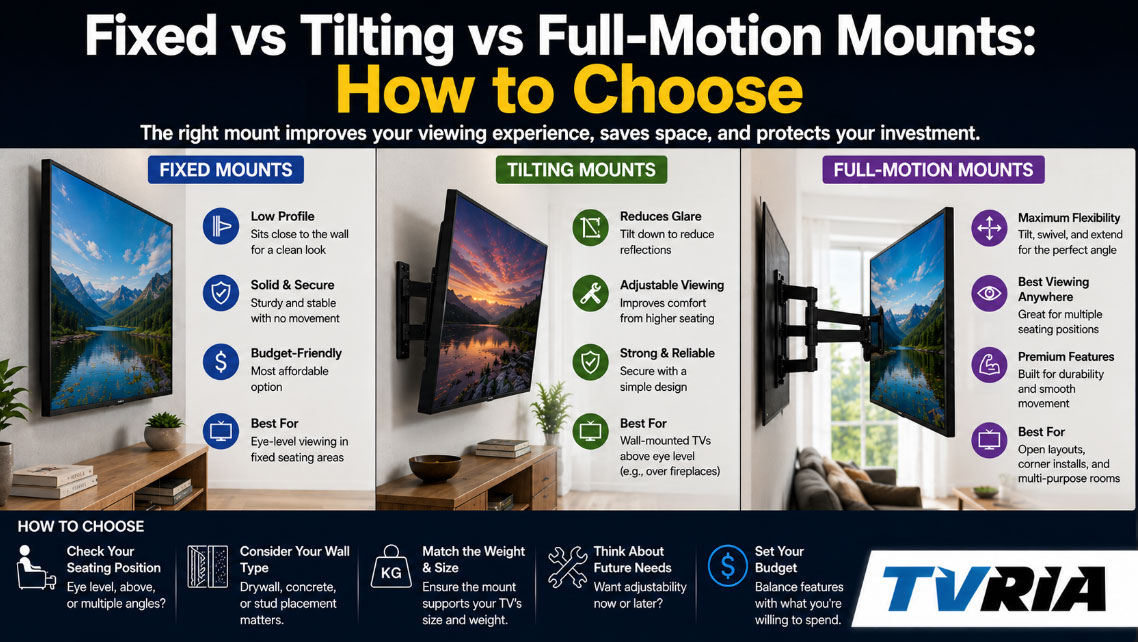
- Choose a fixed mount if your TV will sit at or near eye level and you never plan to adjust the angle. It's the cheapest, slimmest, and most stable option.
- Choose a tilting mount if the TV is going above eye level — over a fireplace, high on a wall, or in a bedroom facing a bed — and you need to angle the screen downward to kill glare and improve the viewing angle.
- Choose a full-motion mount (also called an articulating or cantilever mount) if you need to swivel the screen toward different seating areas, pull it away from the wall, or watch from an off-center angle, such as in a kitchen, corner room, or open-concept living space.
That's the framework. Everything below explains why.
What These Mounts Actually Do, in Plain Terms
Before comparing them, it helps to understand what "fixed," "tilting," and "full-motion" actually mean mechanically, because the marketing language on mount packaging can get needlessly technical.
Fixed Mounts (aka Flat or Low-Profile Mounts)
A fixed mount holds the television flush and parallel to the wall, with almost no gap — often less than an inch. There's no hinge, no pivot point, no moving parts of any kind. Once it's on the wall, the screen's position is permanent. Think of it as the picture-frame approach to TV mounting: clean, minimal, and immovable.
Tilting Mounts
A tilting mount adds a single axis of movement — up and down. The bracket includes a hinge mechanism that lets you angle the top of the screen forward, typically somewhere between 5 and 15 degrees, depending on the model. It doesn't swivel left or right, and it doesn't extend away from the wall. It just tilts.
Full-Motion Mounts (aka Articulating or Cantilever Mounts)
A full-motion mount is the most mechanically complex of the three. It uses an articulating arm — sometimes single-arm, sometimes dual-arm — that lets you pull the screen out from the wall, swivel it left or right, tilt it up or down, and in some cases rotate it into portrait orientation. It's the closest thing to a TV on a movable joint.
Fixed vs Tilting vs Full-Motion: Side-by-Side Comparison
| Feature | Fixed Mount | Tilting Mount | Full-Motion Mount |
|---|---|---|---|
| Movement | None | Up/down tilt only | Swivel, tilt, and extension |
| Distance from wall | 0.5"–1.5" | 1"–2.5" | 3"–24"+ (varies by model) |
| Best viewing height | Eye level | Above eye level | Any height, any angle |
| Glare reduction | Poor | Good | Excellent |
| Cable access after install | Difficult | Moderate | Easy (arm pulls out) |
| Weight capacity range | Often highest | High | Moderate to high |
| Typical price range | $20–$60 | $30–$90 | $60–$250+ |
| Installation difficulty | Easiest | Easy | Moderate |
| Ideal room | Media room, home theater | Bedroom, over fireplace | Kitchen, corner, open floor plan |
| Adjustability after mounting | None | Limited | Extensive |
| Profile/thickness | Slimmest | Slim | Bulkier |
Keep this table in mind as you read through the deeper breakdowns below — the "best" column depends entirely on your room, not on which mount is objectively superior.
Fixed Mounts: The Case for Doing Less
There's a reason fixed mounts remain the top seller in most hardware and electronics stores. They're the simplest solution to the simplest problem: getting a TV flat against a wall, permanently, without paying extra for flexibility you'll never use.
Where Fixed Mounts Win
Fixed mounts make the most sense when the television is going to be installed at or very near eye level while seated — a dedicated media room, a home theater setup, or a living room where the couch faces the wall dead-on with no side seating to accommodate. In these situations, tilt and swivel are solving a problem that doesn't exist.
They also tend to hold more weight relative to their price than tilting or articulating mounts, because there's no hinge mechanism to engineer around. A basic fixed mount can often support the same 75-inch, 60-pound television that a similarly priced tilting mount would strain against.
The other underrated advantage is the profile. Fixed mounts sit closer to the wall than any other type — often under an inch — which gives a built-in, almost architectural look. If you're mounting above a media console in a minimalist room, this is the mount that disappears visually.
Where Fixed Mounts Fall Short
The tradeoff is permanence. Once it's up, it's up. If you mount the TV slightly too high — a common mistake — you're stuck looking up at a fixed angle indefinitely, or you're taking the whole thing down to start over. Fixed mounts also make cable management and port access genuinely annoying, since there's no way to pull the screen away from the wall to reach the back panel. Anyone who's tried to plug in an HDMI cable behind a fixed-mounted TV with six inches of clearance knows this pain well.
Tilting Mounts: Solving the Fireplace Problem
Tilting mounts exist because of one very specific, very common design mistake: mounting a TV above a fireplace. It looks great in home renovation photography and terrible in practice, because the viewer ends up craning their neck upward at an unnatural angle for the entire runtime of whatever they're watching.
Where Tilting Mounts Win
Any situation where the TV sits above natural eye level benefits from a tilting mount. That includes over-the-fireplace installations, TVs mounted high in a bedroom facing the bed, or wall-mounted screens in a room with vaulted ceilings where the natural mounting height is simply higher than ideal.
The tilt mechanism, even at a modest 10–15 degrees, redirects the screen's angle downward toward the seating area, which meaningfully reduces glare from overhead lighting and windows while correcting the neck-craning problem. It's a small mechanical addition that solves a specific, well-documented viewing issue.
Tilting mounts also tend to hold weight nearly as well as fixed mounts, since the added hinge is a relatively simple piece of engineering compared to a full articulating arm.
Where Tilting Mounts Fall Short
Tilting mounts only move in one direction. If your seating is off to the side — a sectional sofa, a kitchen island, a bedroom with a reading chair in the corner — a tilt mount does nothing to help you see the screen straight-on. It solves vertical glare and viewing angle, not horizontal positioning.
Full-Motion Mounts: Built for Flexible Living
Full-motion mounts cost more and install with slightly more effort, but they solve a problem neither of the other two mount types can touch: horizontal flexibility. If more than one seating area needs to see the same screen, or if the room's layout changes depending on the occasion, this is the mount category built for that.
Where Full-Motion Mounts Win
Kitchens are the clearest example. A TV mounted in a kitchen often needs to swing toward the dining table during dinner and back toward the living room during cleanup — a fixed or tilting mount simply can't do that. Corner installations are another strong case, since a full-motion arm lets you angle the screen out of the corner and toward the room rather than pointing it uselessly into empty space.
Open floor plans, multi-purpose rooms, and any space where furniture gets rearranged seasonally also benefit enormously from full-motion mounts. Because the arm extends outward, cable access and port reach become dramatically easier too — you can pull the entire screen away from the wall to plug in a new HDMI cable rather than working blind behind a flush-mounted panel.
Where Full-Motion Mounts Fall Short
The added engineering brings tradeoffs. Full-motion mounts sit further from the wall even in their retracted position, which some people find visually bulkier than a fixed or tilting setup. They also tend to cost more — often two to three times the price of a basic fixed mount for the same weight capacity — and the installation, while still doable, involves a slightly steeper learning curve, particularly for dual-arm models supporting larger screens.
There's also a structural consideration: because the arm extends the television's weight further from the wall studs, proper stud placement and mount-to-wall anchoring matter more here than with the other two types. A full-motion mount installed poorly is a bigger liability than a fixed mount installed poorly, simply because there's more leverage working against the wall anchors.
Factors That Should Actually Drive Your Decision
Rather than picking a mount type first and working backward, it's worth running through these five questions in order.
1. Where Is the TV Going, Relative to Eye Level?
This is the single biggest factor. Eye level while seated → fixed mount is fine. Above eye level → you need at least a tilt. Off to the side of the main seating area → you need full motion.
2. Is There More Than One Viewing Angle?
If the room has a single, fixed seating arrangement facing the wall dead-on, you don't need swivel. If people watch from a kitchen table, a side sectional, a bar area, or a bedroom where the bed isn't centered on the wall, full motion earns its higher price tag.
3. How Much Does the TV Weigh, and What's the Screen Size?
Weight capacity varies significantly between mount categories, and it's not simply "bigger mount, more weight." A fixed mount rated for 80 pounds may cost less than a full-motion mount rated for 60 pounds, because the engineering complexity — not the raw materials — drives the price. Always check the VESA pattern on the back of your television (the grid of mounting holes, measured in millimeters) against the mount's compatible VESA range before buying. The Video Electronics Standards Association publishes the official specifications for these patterns at VESA.org, and cross-checking your TV's exact VESA size there avoids the single most common mounting mistake: buying a mount that physically doesn't match the bolt pattern.
4. What's the Wall Made Of?
Drywall over wood studs is the easiest and most common scenario, and any mount type works with proper stud anchoring. Brick, concrete, and plaster walls require different hardware entirely — masonry anchors rather than standard lag bolts — and it's worth confirming your mount kit includes (or is compatible with) the right anchors before starting. Consumer Reports has published wall-anchor and stud-finder buying guides that are useful reference points if you're unsure what your wall can support.
5. How Much Are You Willing to Spend?
Fixed mounts are the budget-friendly default, tilting mounts add a modest premium for meaningful glare and comfort improvements, and full-motion mounts represent the biggest jump — but only because they're doing genuinely more mechanical work. Buying a full-motion mount for a media room where it'll never actually move is spending money on flexibility you won't use. Buying a fixed mount for a kitchen where three people watch from three different angles is the opposite mistake.
Real Rooms, Real Recommendations
Reading specs in the abstract only goes so far. Here's how the decision plays out in the rooms people actually mount TVs in.
The Home Theater or Dedicated Media Room
Seating is fixed, centered, and typically at a consistent distance from the screen. A fixed mount is almost always the right call here — it's cheaper, holds more weight for the price, and the slim profile keeps the wall looking clean, which matters in a room designed around the screen as a focal point.
Above the Fireplace
This is the textbook case for a tilting mount. The mantel height nearly always pushes the TV above natural eye level, and a 10–15 degree downward tilt corrects the neck strain and glare that come with a too-high installation. If the fireplace wall also serves a room with side seating, consider full motion instead — but for a straightforward, couch-facing living room, tilt is usually sufficient.
The Bedroom
If the TV sits on a dresser wall directly across from a centered bed, a tilting mount handles the job well, especially if the mount height is slightly elevated. If the bed isn't centered on that wall — common in smaller or oddly shaped bedrooms — a full-motion mount lets you angle the screen toward wherever the pillows actually are.
The Kitchen
Kitchens are rarely designed with a single fixed viewing angle in mind. Between the stove, the island, and the dining table, sightlines shift constantly. This is one of the clearest cases for a full-motion mount, ideally a compact model designed for smaller screens, since most kitchen TVs run 24 to 43 inches.
Corner Installations
Corners are geometrically awkward for television mounting under the best circumstances. A fixed or tilting mount in a corner often leaves the screen angled uselessly into the room's dead space. A full-motion mount lets you extend the arm and rotate the screen to actually face the seating area, which is close to mandatory in this scenario rather than a nice-to-have.
Open-Concept Living and Great Rooms
Large, multi-zone rooms where the kitchen, dining, and living areas blend together are prime territory for full-motion mounts, particularly dual-arm models that support wider swing ranges. The investment pays off every time the screen needs to face a different zone of the room.
Common Mistakes People Make When Choosing a Mount
A few patterns show up again and again in TV mounting regrets, and most are avoidable with a little forethought.
Mounting too high "for looks." A television mounted at gallery height above a media console might photograph well, but it's a poor viewing angle for anyone actually watching for more than ten minutes. Eye level while seated should drive placement, not wall proportions.
Buying a mount based on TV size alone rather than weight and VESA pattern. Screen size in inches tells you almost nothing about the mount you need. A 65-inch OLED and a 65-inch older LED panel can weigh dramatically differently, and their VESA patterns aren't guaranteed to match either.
Assuming full motion means "better" in every case. More mechanical flexibility isn't automatically an upgrade if the room only ever needs one fixed angle. It's extra cost and extra wall clearance for a feature that goes unused.
Skipping the stud finder. Every mount type — fixed, tilting, or full-motion — depends on proper anchoring into wall studs (or the correct masonry hardware for brick and concrete). This is the step most likely to be rushed and most likely to cause problems later, particularly with heavier screens on full-motion arms where leverage multiplies the strain on the wall.
Where to See Mounts in Person Before You Buy
Specs and photos only tell you so much — testing the tilt range or swing radius of a mount in person, especially for a full-motion model, is worth the trip if you're near a home improvement or electronics retailer. Many local AV and home theater installation shops keep working display units where you can physically test the range of motion before committing. If you're researching local installers, a typical business listing looks something like this:
Example: [Business Name] Home Theater & Mounting Services 123 Main Street, Suite 4 [City], [State] [ZIP Code] Phone: (555) 010-0199 Hours: Mon–Sat, 9 AM–6 PM
Swap in your own local installer's details if you're publishing this as a resource for your area — most cities have at least one independent AV shop or mounting specialist worth calling before a DIY install, particularly for anything over 65 inches or mounted higher than a standard ladder can safely reach.
For broader buying research, Wirecutter and CNET both maintain regularly updated mount recommendation guides that test weight capacity and build quality across brands, which is useful if you want a second opinion beyond manufacturer specs.
Frequently Asked Questions
Can I install a full-motion mount on drywall alone, without hitting studs? No — full-motion mounts place significant leverage on the wall anchor point when extended, and drywall alone cannot safely support that load for any meaningful TV size. Stud mounting, or appropriate heavy-duty anchors rated for the specific weight, is required.
Do tilting mounts reduce glare from windows as well as overhead lighting? Partially. A downward tilt helps redirect reflections from ceiling lights and some window angles, but it won't eliminate glare from a window directly facing the screen. In that case, curtains or repositioning the seating area matters more than the mount itself.
Is a full-motion mount overkill for a bedroom TV? Not necessarily — it depends on whether the bed is centered on the wall the TV faces. If it is, a tilting mount is usually sufficient and less expensive. If the layout is asymmetrical, full motion solves a real problem rather than adding an unused feature.
How much clearance does a full-motion mount need to fully extend? This varies by model, but most residential full-motion mounts extend somewhere between 15 and 24 inches from the wall at full reach. Always check the manufacturer's extension specification against your room's furniture layout before buying, particularly in smaller rooms where a fully extended arm could interfere with foot traffic.
Can I switch mount types later without buying a new TV bracket? Usually yes, since most mounts attach to the TV using the same VESA bolt pattern. You'd need to remove the old mount, patch and repair the wall anchor points if the new mount's footprint differs, and install the new mount into studs. It's a manageable weekend project but not a five-minute swap.
The Bottom Line
The mount you choose should follow directly from where the television lives and how the room is actually used, not from whichever option has the most impressive-sounding features on the box. A fixed mount is the right, economical choice for a straightforward media room. A tilting mount solves the specific and very common problem of a TV mounted above eye level. A full-motion mount earns its higher price in kitchens, corners, and multi-purpose rooms where the viewing angle genuinely changes throughout the day.
Get the room and the seating arrangement right first, and the mount decision mostly makes itself.