
Universal Remotes vs Smart Hub Apps: Which Simplifies Life More?
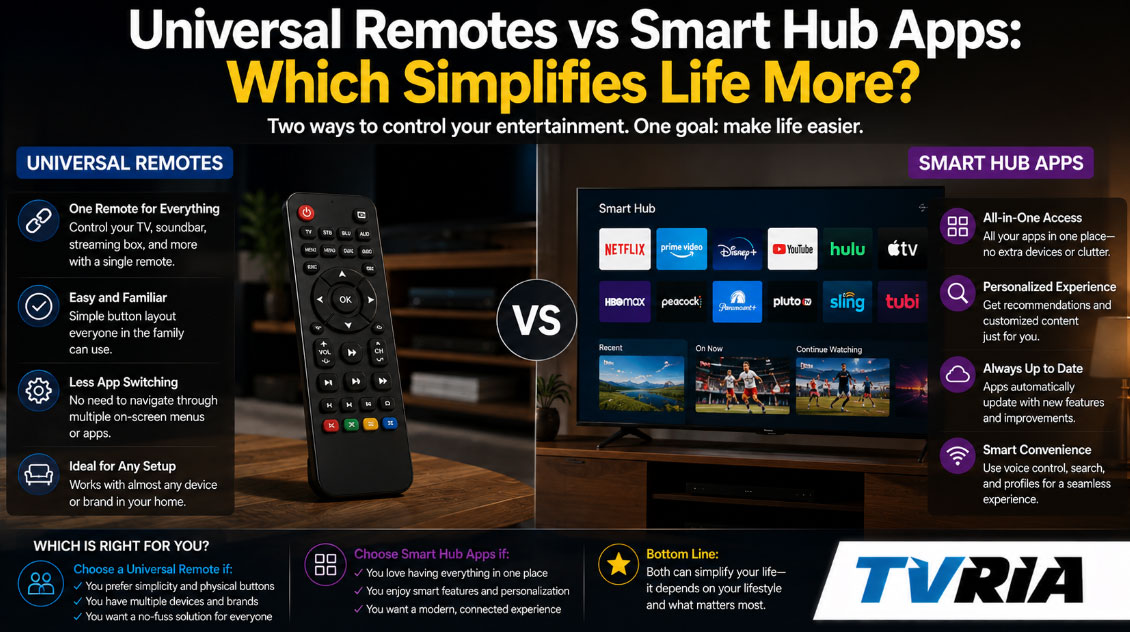
There's a particular kind of chaos that lives on most coffee tables: a TV remote, a soundbar remote, a streaming-stick remote, and at least one mystery remote nobody can identify anymore. Somewhere nearby sits a phone loaded with four or five smart home apps, each one guarding its own slice of the house. Between the clicker drawer and the app folder, the promise of a "simple" connected home has quietly turned into its own small chore.
Two products claim to fix this: the universal remote and the smart hub app. One is a physical object you hold in your hand. The other lives on your phone or a wall-mounted tablet. Both promise to collapse every device in the house into a single point of control. Only one of them actually delivers that for most households, and the answer depends far more on how you live than on which gadget has the better spec sheet.
This piece walks through both categories in detail — what they do well, where they quietly fail, and which one is worth your money depending on your household. Along the way, we'll point to some of the better independent resources for further reading, since this is a category where the "best" pick shifts every few months as new hardware ships.
What a Universal Remote Actually Solves
A universal remote is, at its core, a translator. It learns the infrared, Bluetooth, or radio-frequency signals of your TV, receiver, streaming box, and game console, then repackages them into a single set of buttons or a touchscreen. Press one button, and the remote fires off a sequence of commands: turn on the TV, switch the receiver to the right input, power up the streaming box, dim the lights if it's networked to your smart bulbs too.
This category has changed shape substantially over the past few years. Logitech's Harmony line, once the default recommendation for anyone drowning in remotes, was discontinued, which opened the door for a wave of newer competitors. Today, the most commonly recommended options are hub-and-remote combos like the SofaBaton U2 and X1S, alongside app-first IR blasters like the Broadlink RM4 Pro that skip the handheld remote entirely and route everything through your phone.
Where the Physical Remote Still Wins
There is something a touchscreen can never fully replace: tactile, muscle-memory control. A universal remote sits on the couch arm, and your hand finds the volume rocker without your eyes leaving the screen. No app has to load. No Wi-Fi handshake has to complete. You press a button, and the TV responds in a fraction of a second.
This matters more than it sounds like on paper. Households with older relatives, young kids, or anyone who finds phone-based control fussy tend to gravitate hard toward a dedicated remote. A remote doesn't lock, doesn't need a passcode, doesn't get left in another room, and doesn't require Bluetooth pairing every time the batteries in your earbuds die and steal your attention. It is a single-purpose object, and single-purpose objects tend to be forgiving of user error in a way that multi-purpose apps rarely are.
The best modern universal remotes also handle "Activities" — a single button press that fires off a whole macro, like "Watch a Movie," which simultaneously switches the TV input, powers the receiver, and dims connected lighting. That one-touch simplicity is the entire pitch of the category, and when it works, it genuinely does collapse a five-remote coffee table into a single object.
Where the Physical Remote Falls Short
The honeymoon period with a universal remote tends to end at the edges of its device list. IR-based remotes need line of sight to the device they're controlling, which becomes a problem the moment your streaming box is tucked into a cabinet. Smart home functions — locks, thermostats, cameras, sensors — are usually bolted on as an afterthought, if they're supported at all. Most handheld universal remotes are built for entertainment centers, not whole-house automation, and pushing them past that scope tends to expose the seams.
Setup can also be more involved than the marketing suggests. Programming a remote to recognize every device, brand, and macro sequence in a moderately complex entertainment stack can eat up an evening, and troubleshooting a misfired Activity — when the TV turns on but the receiver doesn't switch inputs — is a familiar frustration for anyone who has lived with one of these remotes for more than a few months.
What a Smart Hub App Actually Solves
A smart hub app takes the opposite approach. Instead of centralizing physical button presses, it centralizes accounts, device profiles, and automation logic inside a piece of software. Apps like Samsung SmartThings, Google Home, Amazon Alexa, and Apple Home each sit on top of a network of Wi-Fi, Zigbee, Z-Wave, or Thread-connected devices, letting you view and control everything from lights to locks to thermostats to cameras from one screen.
This is where the Matter standard has genuinely reshaped the category. Backed jointly by Apple, Google, Amazon, and Samsung, Matter lets a certified device — a smart plug, a light bulb, a lock — work across multiple hub apps instead of locking you into one ecosystem forever. That interoperability is a meaningful shift from just a few years ago, when picking a smart home platform meant committing to it for the long haul.
Where the App-Based Hub Wins
The single biggest advantage of a hub app is scope. It isn't limited to your entertainment center. A well-set-up hub app can control lighting scenes, door locks, garage doors, irrigation systems, security cameras, thermostats, and yes, in many cases, your TV and streaming devices too, especially once Matter-certified smart plugs and IR bridges are added into the mix.
Automation is the other major selling point. A universal remote executes a macro when you press a button. A hub app can trigger the same kind of macro automatically — based on time of day, geolocation, a sensor tripping, or a voice command — without anyone touching anything. "Turn off all the lights and lock the door when everyone leaves the house" isn't something a handheld remote can do on its own. It's a natural fit for a hub app's rules engine.
Voice control compounds this advantage. Because Alexa, Google Home, and Apple Home are the assistants most people already talk to for weather and timers, adding "turn on the living room lights" to that same vocabulary feels like an extension of something familiar, not a new skill to learn.
Where the App-Based Hub Falls Short
The flexibility that makes hub apps powerful is also what makes them intimidating. Menus are deep. Settings are scattered across device pages, room views, and automation builders. A guest visiting for the weekend cannot glance at your phone and intuitively figure out how to turn on the TV the way they could with a labeled remote button.
Reliability is the other recurring complaint. Hub apps generally depend on an internet connection, a functioning cloud service, and your phone being unlocked, charged, and in hand. When the Wi-Fi drops or a platform has a service outage, cloud-dependent automations can stall out entirely — a known pain point that has pushed serious smart home users toward platforms with local processing, like Home Assistant or hubs that run automations on-device rather than in the cloud.
There is also a fragmentation problem the industry hasn't fully solved. Even with Matter narrowing the gap, plenty of households still end up juggling two or three hub apps because a specific brand of lock, camera, or robot vacuum only plays nicely with one ecosystem.
Head-to-Head: The Real-World Comparison
Specs only tell part of the story. Here's how the two categories actually stack up on the things that matter day to day.
| Factor | Universal Remote | Smart Hub App |
|---|---|---|
| Best for | Entertainment centers (TV, streaming, audio, game consoles) | Whole-home automation (lighting, locks, sensors, thermostats, cameras) |
| Setup time | 20–60 minutes per device, longer for complex macros | 15–20 minutes for the hub itself; longer as you add each device |
| Ease for guests / kids / elderly users | High — physical buttons are self-explanatory | Lower — requires the app, an account, and phone access |
| Works during Wi-Fi outages | Mostly yes (IR/RF remotes don't need internet) | Often limited or fully offline unless the hub processes locally |
| Voice control | Rare, occasionally via smart home buttons | Standard (Alexa, Google Assistant, Siri) |
| Automation (time/location/sensor triggers) | Minimal to none | Core feature |
| Device scope | Mostly AV gear; smart home support is secondary | Whole house: lights, locks, thermostats, sensors, cameras, plus AV via Matter bridges |
| Ongoing cost | One-time purchase, roughly $30–$400 depending on model | Often free software, though some devices and cloud features carry subscriptions |
| Learning curve | Low once programmed | Moderate to steep, especially for automations |
| Cross-brand compatibility | Broad for AV brands via IR/RF databases | Increasingly broad thanks to Matter, though gaps remain |
| Physical reliability | Batteries can die; remote can be lost | Phone must be charged, unlocked, and nearby |
Looking at that table, the split becomes obvious: universal remotes optimize for speed and simplicity within a narrow domain, while hub apps optimize for breadth and intelligence across the whole house, at the cost of a steeper learning curve.
The Setup Experience, Honestly
Reviewers who have tested both categories side by side tend to describe the setup gap in similar terms. A universal remote's initial pairing is usually straightforward, but building out full "Activities" that correctly sequence multiple devices takes patience and occasional troubleshooting, particularly with older AV receivers or less common TV brands.
Hub apps, by contrast, tend to be genuinely easy at the platform level — Apple's HomePod setup is close to tap-and-go, and Amazon's Echo Hub walks new users through a guided QR code scan — but the difficulty compounds as your device count grows. Adding your fifth, tenth, or twentieth device, each with its own manufacturer app, its own account, and its own firmware quirks, is where hub app setup stops feeling like a five-minute task and starts feeling like ongoing IT work for your house.
The Guest Test
Here's a practical way to think about which option actually simplifies life: hand the control method to someone who has never used your setup before, and see what happens.
Hand someone a universal remote, and within a few seconds they can usually find "power" and "volume," even if they've never seen that specific model. The buttons are labeled. The mental model is familiar because it mimics every remote they've used since childhood.
Hand someone your phone unlocked to a smart home app, and the experience is murkier. They need to know which room the device lives in, which icon represents the TV, and whether that particular gadget is even controllable from the app they're looking at versus a different manufacturer app entirely. This is less a knock on any single hub app's design and more a structural reality of software: menus require exploration in a way that physical buttons don't.
The Reliability Question
Nothing exposes the difference between these two categories faster than an internet outage. An IR or RF-based universal remote keeps working when the Wi-Fi goes down, because it's talking directly to your TV and receiver over a local signal, not routing commands through a cloud server.
Many smart hub apps, especially ones tied to cloud-first platforms, stumble in the same scenario. If the automation logic or device state lives on a remote server rather than on local hardware, a router reboot or an ISP hiccup can mean your lights, locks, and thermostat all become briefly unresponsive from the app — even though the physical devices are sitting right there on your network. This is precisely why local-processing platforms like Home Assistant, and hubs that explicitly market local automation, have built such a loyal following among people who got burned by an outage at an inconvenient moment.
What This Actually Costs Over Time
Universal remotes are typically a one-time purchase. Budget models start under $20; capable multi-device remotes with hubs, like the SofaBaton U2 or X1S, run somewhere in the $60–$180 range, and premium touchscreen options can climb higher. Once it's programmed, there's no subscription, no account, and no ongoing fee tied to the remote itself.
Smart hub apps are usually free to download and use for core functionality — pairing devices, building basic automations, and voice control don't typically require a subscription. But the ecosystem around them often does. Cloud video storage for security cameras, advanced routine features, and some premium automation tools are frequently gated behind a monthly fee, even if the base hub app itself costs nothing. It's worth checking the fine print for any specific device before assuming "free app" means "free forever."
The Hybrid Answer Nobody Talks About Enough
Treating this as an either-or choice is, honestly, a bit of a false framing. The households that report the least frustration tend to use both, each for what it's actually good at.
A universal remote handles the entertainment center: TV, receiver, streaming box, game console, all collapsed into Activities that fire with a single button press from the couch. A hub app handles everything the remote was never built for: door locks, motion-triggered lighting, thermostat schedules, and voice-activated routines that don't require anyone to be holding anything at all.
This is increasingly easy to pull off now that Matter has narrowed the gap between ecosystems. A Matter-certified smart plug can bridge an otherwise "dumb" appliance into your Google Home or Apple Home routines, while your universal remote continues handling the couch-side entertainment controls it was designed for. Rather than forcing one tool to do a job it's structurally bad at, splitting responsibilities according to strength tends to produce the calmest, most reliable setup.
So, Which One Actually Simplifies Life More?
The honest answer is that it depends on the shape of the problem you're trying to solve.
If your household's biggest daily friction is a coffee table cluttered with remotes and a nightly ritual of pressing the wrong buttons in the wrong order to get the TV working, a universal remote is the faster, more forgiving fix. It's tactile, it doesn't need Wi-Fi, and anyone in the house — including guests, kids, and grandparents — can pick it up and understand it immediately.
If your friction point is scattered control across a growing list of connected devices — locks you forget to check, lights you leave on, a thermostat you never remember to adjust — a smart hub app is doing a job no remote was ever designed to do. Its value comes from automation and reach, not from being effortless in the first five minutes.
For most people with a moderately connected home, the realistic best answer is both: a remote for the couch, an app for the house. Anyone shopping for either should lean on current, hands-on reviews rather than manufacturer marketing pages, since both categories update frequently. Independent testing from outlets like The Verge, CNET, and Wirecutter tends to hold up well because they retest picks as new hardware and firmware ship.
Frequently Asked Questions
Do universal remotes work with smart home devices like lights and locks? Some do, in a limited way — a handful of buttons can trigger a scene or two if the remote is paired to a compatible hub. But this is usually a secondary feature bolted onto a remote built primarily for AV gear, not a replacement for a dedicated smart home app.
Can a smart hub app fully replace a TV remote? For basic power and volume, often yes, especially once Matter-enabled IR bridges are involved. For frame-accurate scrubbing, fast channel surfing, or gaming, most people still prefer the tactile speed of a physical remote or the device's native controller.
What happens to my smart home automations if the internet goes down? It depends entirely on whether your hub processes automations locally or in the cloud. Platforms that emphasize local processing keep working through an outage; cloud-first platforms may pause automations until connectivity returns.
Is Matter making universal remotes obsolete? Not exactly — Matter is mostly reshaping the smart hub side of the market by improving cross-brand compatibility. Universal remotes still fill a distinct role for entertainment-center control that hub apps generally don't replicate as smoothly.
Which option is better for elderly family members? A physical universal remote, in most cases. Labeled buttons and no app-navigation requirement make it far more forgiving for anyone less comfortable with touchscreens.