
How to Extend the Lifespan of Your OLED TV
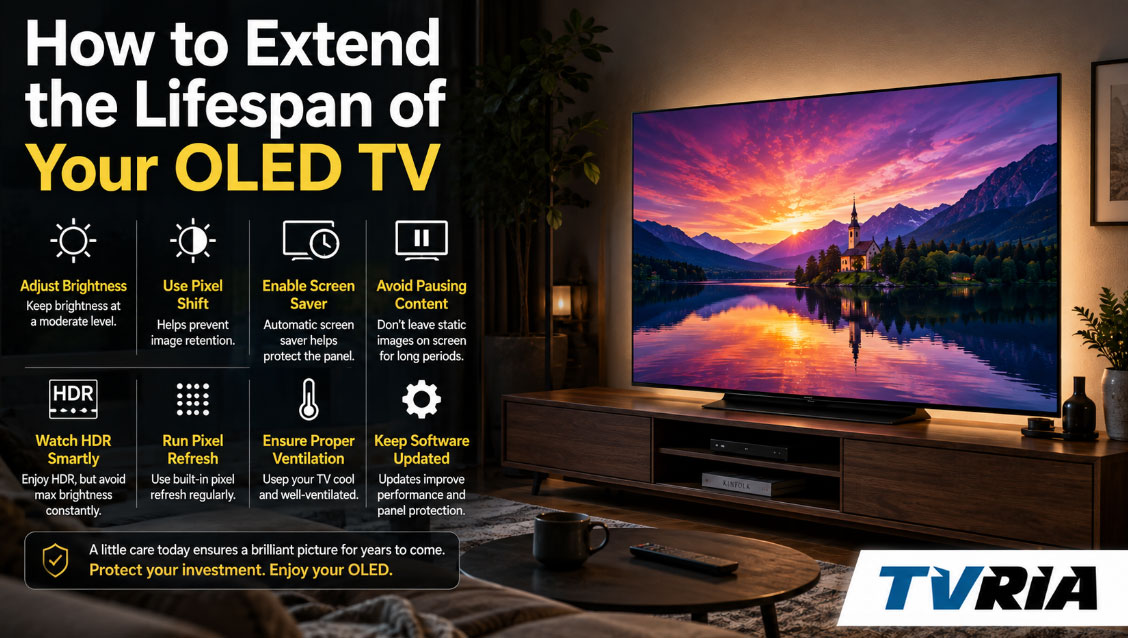
An OLED television is not just another appliance you plug in and forget. It is a panel made of millions of self-lit organic diodes, each one aging slightly every time it fires. Treat it well and it can deliver a decade or more of inky blacks and vivid color. Treat it carelessly and you may notice faded logos or dull whites years before you expected. This guide walks through what actually shortens an OLED's life, what genuinely helps, and which "tips" floating around forums are outdated or overblown.
Nothing here requires expensive gadgets or obsessive babysitting. Most of the habits below cost nothing but a few menu taps, and once they're set, you can go back to simply enjoying the picture.
Why OLED Panels Age Differently Than LCD and Mini-LED TVs
Traditional LED and Mini-LED televisions use a backlight shining through a liquid crystal layer. The backlight ages, but the liquid crystals themselves don't really "wear out" from use in any meaningful way. OLED works completely differently. Every single sub-pixel is its own tiny light source made from an organic compound that emits light when current passes through it. That organic material degrades a little with every hour it's illuminated, and brighter, more frequently used pixels degrade faster than dimmer, less frequently used ones.
This is the entire root cause of everything you'll read about OLED longevity. It's also why OLED panels achieve perfect black (a pixel that's off emits nothing) but come with a maintenance mindset that LCD owners never had to think about.
Two consequences follow from this:
- Overall brightness decay. Over thousands of hours, the panel's peak brightness gradually decreases as the organic diodes lose efficiency. This is uniform and mostly imperceptible in daily use.
- Uneven wear, or burn-in. If certain pixels display the same bright, static content for hundreds of hours while their neighbors show varied content, those specific pixels dim faster than the rest. The result is a faint but permanent ghost image.
Nearly every longevity tip in this article exists to slow one or both of these processes.
Image Retention vs. Burn-In: Know the Difference
People use these terms interchangeably, but they describe very different situations, and confusing them leads to unnecessary panic.
Image Retention Is Temporary
If you leave a paused video game or a channel logo on screen for twenty minutes and then switch to something else, you might see a faint outline linger for a few seconds or minutes. This is image retention — a short-lived electrical effect, not physical damage. It clears up on its own once you display varied, moving content, and it is completely normal.
Burn-In Is Permanent
Burn-in happens when uneven pixel wear becomes baked into the panel after prolonged, repeated exposure to the same static elements — think a 24-hour news ticker, a stock market channel, or a static video game HUD run for thousands of cumulative hours. Once burn-in sets in, it does not fade with different content, and manufacturer "cleaning" cycles can only partially soften it, not undo it. According to manufacturers including Samsung, LG, and Apple, burn-in is generally treated as normal wear and typically excluded from standard warranty coverage, which is exactly why prevention matters more than any after-the-fact fix.
The good news: modern OLED panels are dramatically more burn-in resistant than the sets from five or six years ago, thanks to better heat management, brighter and more efficient organic compounds, and smarter built-in protection software. Independent, long-running tests from RTINGS.com back this up — their multi-year accelerated longevity study has tracked over a hundred televisions and found that most TVs retain more than 80 percent of their original performance after roughly three years of average use, with results varying meaningfully by panel generation and brand. You can review their raw findings at rtings.com/tv/tests/longevity-burn-in-test-updates-and-results.
Seven Habits That Genuinely Extend an OLED's Life
1. Turn Down Peak Brightness for Everyday Viewing
This is the single most impactful thing you can do. Organic diodes degrade faster the harder they're driven. Watching everything at maximum brightness, especially in a bright room where you're compensating for glare, accelerates wear across the whole panel. Dialing brightness down to a comfortable level for your room — most living rooms don't actually need anywhere near peak output — slows degradation and, as a pleasant side effect, deepens the black levels that make OLED look so good in the first place.
A practical approach: use whatever "Filmmaker Mode," "Cinema," or ISF-style preset your TV offers for movies and shows, since these are calibrated to sensible brightness targets rather than the artificially punchy settings stores use to catch your eye on a showroom floor.
2. Avoid Marathon Sessions of Static Content
News channels with permanent tickers and logos, stock tickers, and paused video games are the classic burn-in culprits. It's not that watching the news is dangerous — it's that watching the exact same static graphic in the exact same screen position for hours a day, every day, for years, is what causes uneven wear. If you're a heavy news watcher, consider occasionally switching to a streaming app or a different channel layout so the same pixels aren't perpetually working harder than the rest of the screen. Sports fans should be aware that scoreboards and score bugs behave the same way as news tickers, just less continuously.
3. Let the Built-In Panel Care Tools Actually Run
Every current OLED TV ships with automated maintenance software specifically engineered to counteract uneven pixel wear. It's easy to dismiss these as gimmicks, but they're doing real, measurable work, and manufacturers configure them by default for a reason.
On LG OLED TVs, the relevant tools live at this menu address: Settings → All Settings → General → OLED Care → OLED Panel Care. Inside you'll find:
- Pixel Cleaning (called Pixel Refresher on pre-2022 sets): a compensation cycle that runs automatically after roughly four cumulative hours of use, or can be triggered manually. LG's own support documentation walks through the exact steps for every model year at lg.com/us/support.
- Screen Shift, which nudges the entire image by a few pixels at set intervals so static logos never sit on the exact same sub-pixels for too long.
- Logo Luminance Adjustment, which automatically detects static bright logos and dims them.
Note that running Pixel Cleaning manually more than once every few weeks isn't recommended — each cycle applies a small compensating voltage, and doing it excessively can very slightly work against the panel rather than for it. Let the automatic schedule handle most of the load.
On Samsung OLED TVs, the equivalent address is: Settings → All Settings → General & Privacy → Panel Care. From there you can confirm Pixel Shift is enabled (it is by default), turn on Adjust Logo Brightness, and let Screen Optimization run its periodic compensation cycle, which typically kicks in automatically after around four hours of cumulative use and takes ten to fifteen minutes with the TV powered off. Samsung's official walkthrough is available at samsung.com/us/support.
The instructions above apply to Sony, Panasonic, and Philips OLEDs too, just under slightly different menu names — look for "Panel Refresh," "Pixel Shift," or "Screen Shift" inside the picture or general settings menu.
4. Use a Screensaver or Auto-Sleep Timer for Static Screens
If your OLED doubles as a computer monitor, a streaming device home screen, or a gaming display that sits idle on a menu, set an aggressive auto-sleep or screensaver timer. A screen that goes dark or drops into standby after five or ten minutes of inactivity is a screen that isn't quietly burning in a taskbar or a paused frame while you step away.
5. Watch Your Aspect Ratio and Black Bars
Widescreen movies with black letterbox bars are generally safe in moderation, since black pixels are simply switched off and don't wear at all. The actual risk comes from watching heavily windowboxed or 4:3 content for extended, repeated periods, where the boundary between the picture and the surrounding gray or dim bars can, over a very long time, create a faint outline. If you frequently watch older 4:3 broadcasts, using your TV's zoom or fill option occasionally, rather than always leaving thick static bars in the same spot, is a reasonable precaution.
6. Keep Your Firmware Up to Date
Manufacturers continually refine their burn-in mitigation algorithms through software updates, sometimes significantly. A firmware update might improve how aggressively the panel dims static logos, smooth out compensation cycle timing, or fix bugs in the panel care suite entirely. Checking for updates every couple of months, or simply leaving automatic updates enabled, means you're always benefiting from the manufacturer's latest thinking on panel protection.
7. Manage Heat and Airflow Around the TV
Heat accelerates the degradation of almost any electronic component, and OLED panels are no exception. Wall-mount or place your TV where air can circulate behind it rather than sealing it into a tight, enclosed cabinet. Avoid stacking heat-generating equipment like older cable boxes or game consoles directly against the back of the panel, and keep the TV out of direct, sustained sunlight, which adds unnecessary thermal load and can cause its own separate discoloration issues over time.
Special Considerations for Gaming and PC Monitor Use
Using an OLED as a PC monitor or a dedicated gaming display puts it under a different kind of stress than typical TV viewing, because desktop interfaces and game HUDs are far more static than a movie or a football broadcast.
A few adjustments make a real difference here:
- Enable auto-hide for your taskbar and dock so it isn't permanently painted onto the same row of pixels.
- Use a dark desktop background and dark-themed applications where possible, since darker content means less cumulative pixel stress.
- In games, look for HUD opacity sliders or minimalist HUD options, and take breaks rather than leaving a paused game on screen for hours.
- If you're gaming, switch on your TV's dedicated Game Mode or Game Optimizer — beyond the input-lag benefits, most manufacturers keep their logo-dimming and pixel-shift protections active in this mode too, so you don't have to choose between responsiveness and panel care.
RTINGS' extended torture testing, which pushes panels far harder than any real household ever would, found that dedicated OLED PC monitors held up encouragingly well, showing only minor image retention even after the equivalent of several years of simulated heavy desktop use — a reassuring data point for anyone nervous about mixing OLED with productivity work.
Physical Care: Cleaning, Handling, and Placement
Panel wear isn't the only threat to an OLED's lifespan — physical mishandling can shorten it just as easily.
Cleaning: Power the TV off first, since it's easier to spot streaks and smudges on a dark, blank screen. Use only a dry, clean microfiber cloth, wiping gently in one direction rather than scrubbing in circles. If you need to remove a stubborn mark, lightly dampen the cloth with distilled water — never spray liquid directly onto the panel, and never use glass cleaner, alcohol, or any ammonia-based product, all of which can strip the screen's anti-glare coating.
Handling: OLED panels are noticeably thinner and more delicate than older LCD panels, particularly around the edges. Avoid pressing on the screen, leaning objects against it, or letting pets and children treat it as a climbing surface.
Placement: Beyond the heat considerations mentioned earlier, keep the TV away from open windows and humid rooms like uncovered bathrooms, and if you're wall-mounting, make sure the mount is rated for the set's weight so the panel isn't sitting under unnecessary mechanical stress over the years.
Common Myths About OLED Longevity, Debunked
A lot of outdated or exaggerated advice still circulates about OLED care, much of it left over from the earliest generations of the technology. It's worth clearing a few of these up.
Myth: You should never leave an OLED TV on for more than a couple of hours. This was closer to true a decade ago, but modern panels with active pixel-shift and compensation software handle extended, varied viewing sessions without issue. What matters is content variety, not total hours watched.
Myth: Turning the TV on and off constantly wears it out faster. Power cycling has negligible effect on an OLED panel's lifespan. In fact, letting the TV go through its normal standby routine allows scheduled compensation cycles to run, which is generally beneficial rather than harmful.
Myth: Any static logo will cause burn-in within weeks. Occasional static content — a paused show, a game menu, a channel logo during a normal viewing session — is not the problem. The risk comes from the same static element occupying the same pixels for many hours a day, repeated over months or years, not from brief or occasional exposure.
Myth: OLED panels can't be used for gaming or office work. As covered above, both use cases are entirely viable with a handful of sensible precautions. Millions of people now use OLED monitors and TVs for exactly these purposes without incident.
Myth: A pixel-cleaning cycle will restore full brightness after burn-in. It can reduce mild retention, but it does not reverse structural burn-in. Treat these tools as maintenance, not repair.
So, How Long Should an OLED Actually Last?
This is the question everyone actually wants answered, and the honest response is: longer than most people assume. Manufacturers and independent testers generally estimate that a modern OLED panel takes roughly 60,000 to 100,000 hours of use before brightness drops to half its original output under typical, mixed viewing conditions — that works out to well over a decade at average household usage of four to six hours a day. Burn-in, when it happens at all in normal households, tends to be the result of genuinely extreme, narrow use cases: a single static channel logo running sixteen hours a day for years on end, not the ordinary rotation of movies, shows, sports, and games most people actually watch.
RTINGS' long-term accelerated testing, one of the only rigorous public datasets on this question, has run for years and accumulated well over ten thousand hours of runtime across dozens of televisions. Their conclusion, echoed across the display-testing community, is that normal, varied viewing habits are unlikely to produce noticeable burn-in on a modern panel, and that the televisions most susceptible to problems are the ones dedicated almost entirely to a single static-heavy use case.
Quick Reference Checklist
- Keep everyday brightness moderate; use Filmmaker/Cinema mode for movies and shows
- Avoid leaving the same static logo, ticker, or HUD on screen for hours at a stretch, every day
- Leave Pixel Shift, Screen Shift, and Logo Luminance/Brightness Adjustment turned on
- Let automatic pixel-cleaning cycles run; don't trigger manual cycles more than occasionally
- Set an auto-sleep timer or screensaver for any static desktop, menu, or paused-game use
- Keep firmware updated
- Ensure good airflow behind and around the TV; avoid sealed, cramped cabinets
- Clean only with a dry or barely damp microfiber cloth — never glass cleaner or alcohol
- Mount securely and keep the panel away from direct, prolonged sunlight and humidity
Frequently Asked Questions
Does leaving an OLED TV on all day damage it? Simply having the TV powered on isn't the issue — varied, moving content causes negligible wear. The real risk is hours of the same static image in the same screen position, day after day, which is what leads to uneven pixel aging.
Is it safe to use an OLED TV as a computer monitor? Yes, with sensible precautions. Auto-hide your taskbar, use dark themes, set a short auto-sleep timer, and keep the built-in panel care features enabled. Testing from independent labs shows dedicated OLED monitors hold up well under sustained desktop use when these habits are followed.
Will running Pixel Refresher or Pixel Cleaning fix burn-in? It can meaningfully reduce mild to moderate image retention, but it cannot reverse true, established burn-in. Once pixels have degraded unevenly at the hardware level, that damage is permanent — which is exactly why prevention matters far more than any cleaning cycle.
Do newer OLED TVs burn in less than older models? Generally, yes. Panel efficiency, heat management, and onboard protection software have all improved significantly generation over generation, making recent OLED sets meaningfully more resistant to burn-in than models from five or more years ago, though no OLED panel is entirely immune to extreme, sustained static use.
Does brightness setting really affect how long an OLED lasts? Yes, directly. Organic diodes degrade faster the harder they're driven, so a panel run at high brightness continuously will show wear sooner than one run at a moderate, room-appropriate level. Turning brightness down for everyday viewing is one of the easiest, most effective longevity habits available.
Resources for Further Reading
- RTINGS.com — Longevity & Burn-In Test Updates and Results
- LG USA Support — How to Run the Pixel Refresher
- Samsung Support — Preventing Burn-In on OLED Displays
The Bottom Line
An OLED television rewards a small amount of ongoing attention with years of extra life. None of the habits above require you to babysit the TV or sacrifice picture quality — turning down unnecessary brightness, letting the built-in panel care tools do their job, avoiding hours of static content in the same screen position, and keeping the unit clean and well-ventilated will take you most of the way there. Do these consistently, and the panel that impressed you in the showroom should still be impressing you a decade from now.